ISPConfig Installation schlägt fehl

plusQ

New Member
Hallo,
ich habe einen Hetzner Dedicated Server mit Proxmox 7.4.16 laufen
Vor ca. 2 Wochen habe ich da den 1. V-Server (Container) mit ISPConfig installiert. Mit dem Skript hat das gut funktioniert.
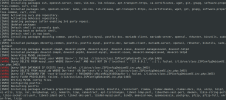
Nun möchte ich neu installieren, aber das Skript bringt mir immer einen Fehler (sie Bild).
Code:
WARNING! This script will reconfigure your complete server!
It should be run on a freshly installed server and all current configuration that you have done will most likely be lost!
Type 'yes' if you really want to continue: yes
[INFO] Starting perfect server setup for Debian GNU/Linux 11 (bullseye)
[INFO] Checking hostname.
[INFO] Enabling contrib and non-free repositories.
[INFO] Updating packages
[INFO] Updated packages
[INFO] Installing packages ssh, openssh-server, nano, vim-nox, lsb-release, apt-transport-https, ca-certificates, wget, git, gnupg, software-properties-common, curl, cron, ntp
[ERROR] Exception occured: ISPConfigOSException -> Installing packages failed. (/ispconfig.ai.php:15)

Hat sich vielleicht am Skript was geändert, seit den 2 Wochen... den am Server nicht.
 

Anhänge

  • ISPConfig_Absturz.png
    ISPConfig_Absturz.png
    215,7 KB · Aufrufe: 623

plusQ

New Member
Ich wollte noch ein paar andere Programme installieren... da kam die Fehlermeldung mit dem NTP

Code:
● ntp.service - Network Time Service
     Loaded: loaded (/lib/systemd/system/ntp.service; enabled; vendor preset: enabled)
     Active: failed (Result: exit-code) since Sat 2023-07-29 13:17:34 UTC; 2min 51s ago
       Docs: man:ntpd(8)
    Process: 15997 ExecStart=/usr/lib/ntp/ntp-systemd-wrapper (code=exited, status=226/NAMESPACE)
        CPU: 1ms

Jul 29 13:17:34 server2 systemd[1]: Starting Network Time Service...
Jul 29 13:17:34 server2 systemd[15997]: ntp.service: Failed to set up mount namespacing: Permission denied
Jul 29 13:17:34 server2 systemd[15997]: ntp.service: Failed at step NAMESPACE spawning /usr/lib/ntp/ntp-systemd-wrapper: Permission denied
Jul 29 13:17:34 server2 systemd[1]: ntp.service: Control process exited, code=exited, status=226/NAMESPACE
Jul 29 13:17:34 server2 systemd[1]: ntp.service: Failed with result 'exit-code'.
Jul 29 13:17:34 server2 systemd[1]: Failed to start Network Time Service.
root@server2:/usr/lib/ntp# timedatectl set-ntp on
Failed to set ntp: Failed to activate service 'org.freedesktop.timedate1': timed out (service_start_timeout=25000ms)
root@server2:/usr/lib/ntp# service ntp status | cat
● ntp.service - Network Time Service
     Loaded: loaded (/lib/systemd/system/ntp.service; enabled; vendor preset: enabled)
     Active: failed (Result: exit-code) since Sat 2023-07-29 13:17:34 UTC; 4min 24s ago
       Docs: man:ntpd(8)
    Process: 15997 ExecStart=/usr/lib/ntp/ntp-systemd-wrapper (code=exited, status=226/NAMESPACE)
        CPU: 1ms
Irgendwie läßt sich NTP nicht installieren...
Ich habe das Ding deinstalliert und dann das Skript mit --no-ntp gestartet.
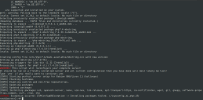
Aber dann kamen Fehler mit MySQL
Ich teste erstmal noch, ob das manuell funktioniert...
 

Anhänge

  • ISPConfig-Mysql-Fehler.png
    ISPConfig-Mysql-Fehler.png
    267,5 KB · Aufrufe: 595

Till

Administrator
Möglicherweise passt da was mit dem bais OS nicht, ist das wirklich Deb 11 und nicht 12, oder war die VM nicht leer? Oder vielleicht zu wenig Platz?
 

Strontium

Member
Ich hab im Hetzner Cloud Server das ISO-Image debian-13.3.0-amd64-netinst.iso eingelegt, nach dem Neustart Debian 13 frisch installiert und ISPConfig so installiert:

Bash:
wget -O - https://get.ispconfig.org | sh -s -- --use-php=8.3,8.4,8.5 --use-ftp-ports=40110-40210 --unattended-upgrades

Die ISPConfig-Installation bricht mit Fehlermeldung ab:

Code:
[INFO] Installed packages php-pear, php-memcache, php-imagick, mcrypt, imagemagick, libruby, memcached, php-apcu, jailkit, php8.3, php8.3-common, php8.3-gd, php8.3-mysql, php8.3-imap, php8.3-cli, php8.3-curl, php8.3-intl, php8.3-pspell, php8.3-sqlite3, php8.3-tidy, php8.3-xsl, php8.3-zip, php8.3-mbstring, php8.3-soap, php8.3-opcache, php8.3-cgi, php8.3-fpm, php8.4, php8.4-common, php8.4-gd, php8.4-mysql, php8.4-imap, php8.4-cli, php8.4-curl, php8.4-intl, php8.4-pspell, php8.4-sqlite3, php8.4-tidy, php8.4-xsl, php8.4-zip, php8.4-mbstring, php8.4-soap, php8.4-opcache, php8.4-cgi, php8.4-fpm, php8.5, php8.5-common, php8.5-gd, php8.5-mysql, php8.5-imap, php8.5-cli, php8.5-curl, php8.5-intl, php8.5-pspell, php8.5-sqlite3, php8.5-tidy, php8.5-xsl, php8.5-zip, php8.5-mbstring, php8.5-soap, php8.5-cgi, php8.5-fpm
[INFO] Disabling conflicting apache modules.
[INFO] Enabling apache modules.
[INFO] Enabling default PHP-FPM config.
[INFO] Setting default system PHP version.
update-alternatives: Fehler: keine Alternativen für php-fpm.sock
[ERROR] Exception occurred: ISPConfigOSException -> Command update-alternatives --set php-fpm.sock /run/php/php8.4-fpm.sock failed. (/ispconfig.ai.php:15)
 

Till

Administrator
Welchen Fehler belommst Du denn, wenn Du den Befehl, der fehlgeschlagen ist, ausführst?

Code:
update-alternatives --set php-fpm.sock /run/php/php8.4-fpm.sock
 

Till

Administrator
Scheinbar hat Ondrej einige Änderungen an seinen Paketen vorgenommen. Ich muss mal sehen, ob er die Konfigurationsoption für die php-fpm.sock entfernt hat.
 

Werbung

Top